About the EE Digital Home Phone Adapter
It offers a simple, wireless way to connect your home phone to your EE hub. With easy plug-in setup, one-button WPS pairing, and a clear LED display, it’s designed for convenience in any room. This guide walks you through setup, safety tips, and troubleshooting, ensuring you get the most from your adapter — whether you're linking a phone or deregistering a device.
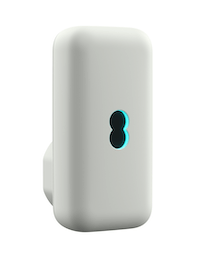
Key features
- Easy to set up
- Plug in your phone in any room
- Press one button to link with your EE Smart Hub
- LED display
Set Up and Use Your Adapter
It's quick and easy to set up and use your Digital Home Phone Adapter.
Linking the Digital Home Phone Adapter with your hub
Make sure your EE Hub is set up and powered on. The steady blue/aqua light indicates it's ready.
- Plug in the adapter: Connect your Digital Home Phone Adapter to a power socket near your hub.
- Press the WPS button on your hub: Find the WPS button on your hub (halfway up, on the left-hand side) and press it.
- Register the adapter: Within 1 minute, press and hold the WPS button on your Digital Home Phone Adapter for 6 seconds. The light on the adapter will flash quickly during registration and turn solid green once complete.
| Adapter light | Indicating |
 | On Initial plug in, the LED will flash orange |
 | During pairing the LED will flash quickly between orange and aqua |
 | Once paired the LED will be solid aqua |
| During a call the LED will flash aqua |
 | Once paired, if there is a connection problem with your broadband the LED will flash red |
 | If you factory reset, the LED will turn solid white for 2 seconds before returning to default |
 | If the adapter can’t find your Smart Hub it will turn solid red |
After your Adapter is set up: Connecting a Home Phone
- Plug in the telephone line cord: Plug in your home phone's existing telephone line cord into the socket on the top of the Digital Home Phone Adapter.
- Check for a dial tone: Your phone should now have the same dial tone as when it was plugged into your old wall socket.
Need to know
Emergency Calls
During power cut and broadband connectivity Issues: You can't make emergency calls (999 or other numbers) from phones connected to your hub or Digital Home Phone Adapter during a power cut or broadband issue.
Make sure you have an alternative way to call for help in emergencies.
Deregistering a Digital Home Phone Adapter from your hub
Using the Smart Hub Manager through a web browser:
- Go to http://192.168.1.254 when connected to your hub or WiFi.
- Once in the Hub Manager, select Phone.
- Scroll down to the adapter you want to remove and select Deregister.
Product help information
Need help with this product? Visit our Set up Digital Home Phone help page.
Product Helpdesk Information
If your product is out of warranty contact EE's recommended agent
By phone: 0330 123 4150
Monday to Friday 8am to 9pm. Saturday to Sunday 8am to 8pm.
Spares information
Replacement parts, including batteries are available from EE's recommended agent on 0800 980 8999.
Disposal and Recycling
Responsible Disposal: You can send it back to EE for recycling, or use local recycling centres and retailer take-back schemes.
Learn about our WEEE regulations.
Guarantee
1-Year Guarantee: your Digital Home Phone Adapter is guaranteed for 1 year from the date of purchase. We'll repair or replace the product if it's not working correctly.
The guarantee covers issues found within the 1-year period and requires proof of purchase. It doesn't cover damage from accidents, misuse, or unauthorised repairs.
Disposing of your old electrical and electronic equipment
The Government is legally required to minimise the unsorted waste disposal of electrical and electronic equipment and to maximise its separate collection and environmentally sound management.
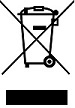
This product may contain substances that could be harmful to people or the environment if it’s not recycled correctly. Check with your retailer to find out how to recycle your old equipment, or if you’ve bought something from us that has the crossed-out wheelie bin symbol on it and it’s similar to the kit you don’t need any more, you can send us your old kit, and we’ll get rid of it in an environmentally friendly way.
For more information, please visit ee.co.uk/weee. We’re not responsible for the costs of returning items. If you don’t wish to return the kit to us, lots of electronics shops have their own ‘take back’ schemes where you can recycle very small electrical and electronic goods. If you’re a household user, you can also take it to your local recycling centre – go to recyclenow.com to find the one nearest to you. Please dispose of this carefully and help to protect our planet.
Safety notice and care instructions
Important safety and care instructions
Your Home Phone Adapter from EE is manufactured to comply with European safety standards. Please read the following instructions carefully before installing and using it.
Making emergency calls
You won’t be able to call 999 (or any other numbers) from this phone if there’s a power outage or you have a problem with your broadband connection. So make sure you’ve got another way to call for help in an emergency.
Installation and location
For indoor use only in the UK.
- Position all parts away from heat and sun (eg away from radiators, window sills or other electrical equipment that can get hot).
- Keep area ventilated (eg don’t put in cupboards or back of sofas) and don’t block any vents with objects or thick carpets.
- Keep device and cables out of young children’s reach.
- Electronic devices hate liquids; don’t place device in damp areas or near sources of water or splashes.
- This device uses wireless technology; check before using or installing where restrictions may apply such as in hospitals.
- Don’t use near flammable substances or in a flammable atmosphere (eg warehouse or garage).
- Designed for use at room temperatures between 0°C and 40°C
Warnings
- IMPORTANT NOTICE IF YOU’RE USING A HEALTHCARE ALARM OR PENDANT Don’t plug any healthcare alarms or medical pendants in to the adapter.
- If any parts of your product, power adapters or any cables appear damaged or make unusual noises, discontinue use immediately. Switch off your electrical socket if it is safe to do so and contact our helpdesk.
- Don’t try to open your device or power adapters. There are no serviceable parts and you risk an electrical shock.
- There is a slight chance your phone could be damaged by an electrical storm. We recommend that you unplug power during an electrical storm.
- If you’ve got a pacemaker please check with your doctor before installation.
- Radio signals from this product may cause interference to hearing aids.
Compliance information
Radio Equipment Directive Declaration of Conformity
EU
Hereby, EE declares that the radio equipment type Home Phone Adapter (model number X17-K43) is in compliance with Directive 2014/53/EU. The full text of the EU declaration of conformity is available at: ee.co.uk/help/terms-and-conditions/ general/declaration-of-conformity
UK
Hereby, EE declares that the radio equipment type Home Phone Adapter (model number X17-K43) is in compliance with Radio Equipment Regulations 2017. The full text of the UK declaration of conformity is available at: ee.co.uk/help/terms-and-conditions/general/declaration-of-conformity.
Radio Transmission Information
| Frequency range (GHz) | Max power |
| 1881.792–1897.344 | ≤24dBm |
Power information
The Home Phone power efficiency information is available at: ee.co.uk/help/terms-and-conditions/general/declaration-of-conformity
Guarantee
Your Home Phone Adapter is guaranteed for 1 year from when you bought it. This means we’ll either repair it or replace all or part of the product if it’s not working properly. If you bought the product more than 28 days ago, we might replace it with a refurbished or repaired one.
Guarantee conditions
- This guarantee only covers problems found in the 1-year guarantee period.
- You’ll need your receipt or other proof of purchase.
- Your product is returned to EE or one of our partners as instructed.
- This guarantee doesn’t cover any problems caused by accidents, misuse, fair wear and tear, neglect, tampering with the equipment, or any attempt at adjustment or repair other than through approved agents.
- This guarantee doesn’t affect your statutory rights.
More accessibility info
EE's Here for You section has further information about Getting the most from your devices.
Documents
You will need Adobe Reader to view PDF documents.