What is Smart Search?
Smart Search is built into the EE TV app on Apple TV 4K. It lets you search the way you think, not just by title. It uses AI to understand natural language, themes and moods, so you simply say the type of show or film you’re after and get personalised suggestions in seconds.
You can describe what you want to watch by:
- Mood – like “feel good”, “edge of your seat”, “chilled”.
- Theme – such as “space adventures” or “British crime drama”.
- Plot elements – for example, “a mystery set in a small town”.
- Quotes or one-liners – even something memorable from a show you can’t quite name.
Smart Search brings together results from live TV, on-demand content and your streaming apps, so you see everything in one place.
Need to know
You can also talk to the EE app to search. In the Search section of the EE TV app, press and hold the voice control button in the centre of your Apple TV remote.
Using Smart Search

Follow these simple steps to get searching:
- Open the EE TV app on your Apple TV 4K.
- Go to Search – in the top left corner of your screen.
- Type or speak what you’re in the mood for — as specific or vague as you like – for example, “Find ‘film title’”; or “Find me programmes about cooking” or simply say “funny”.
- Smart Search will instantly show matches from across all your available services.
Use Mood Matcher to get personalised recommendations
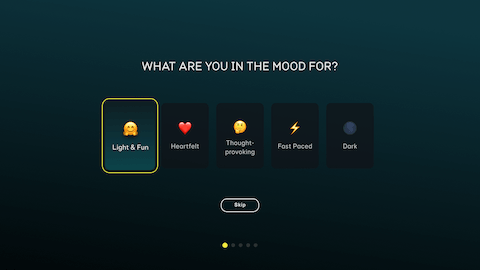
Not sure what to choose? Mood Matcher can help you find your next box set or film quickly.
- Select Mood Matcher in Smart Search.
- Answer a few simple questions about genres, moods and themes.
- Get a curated list of recommendations tailored to your tastes.
It’s an easy, pressure-free way to discover something new.