Pairing your EE TV Box (Pro and Edge) remote
The remotes for the EE TV Box and Edge Box pair with your EE TV Box using Bluetooth.
To pair your remote:
- press the Home and 7 button at the same time
- hold down the buttons until the LED around the EE icon flashes purple three times
Pairing your EE TV Box (Pro and Edge) remote with your TV
Your EE TV Box remote should connect to most TVs automatically. If your remote loses connection, here's how to reset it:
- press the Home and 9 buttons at the same time
- hold the buttons until the LED around the EE icon flashes purple three times
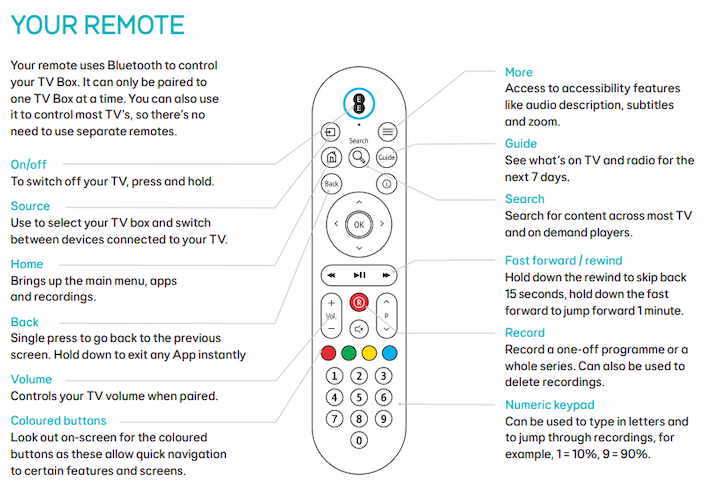
Using your EE TV remote
Need to know
Record button - as well as using it to record programmes, you can use it to delete recordings you no longer need.
Back button - Press and hold to exit any app instantly.
Learn how to use your remote with the EE TV Box Pro user guide
PDF 255 KB, 8 pages
Learn how to use your remote with the EE TV Box Edge user guide
PDF 434 KB, 8 pages