Compare our Smart Hubs

Choosing the right Smart Hub helps you get faster, more reliable WiFi throughout your home. This guide explains the differences between the available Smart Hubs and the features that matter most to busy households. Use it to understand what each hub offers and decide which one is the best fit.

Quick comparison


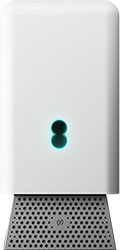
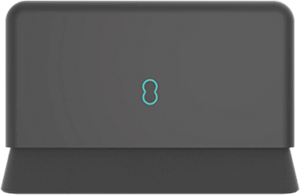
Smart Hub 7 MaxSmart Hub 7 ProSmart Hub 7 Plus
WiFi 7WiFi 7WiFi 7
Full fibreFull fibreFull fibre
Advanced Parental Controls and SecurityAdvanced Parental Controls and SecurityAdvanced Parental Controls and Security
Compatible WiFi / multiple SSIDsCompatible WiFi / multiple SSIDs
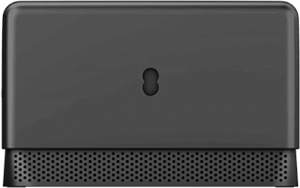
Smart Hub 6 PlusSmart Hub
WiFi 6WiFi 5
Full fibre
Part fibre with select models
Full fibre
Part fibre

Advanced Parental Controls and SecurityBasic Parental Controls and Security
Compatible WiFi / multiple SSIDsSingle SSID

Looking to upgrade your Smart Hub? Have a look at our broadband deals for you.

Detailed Smart Hub comparison

previous
next


Model versionSH40J-X
WiFi standardWiFi 7
Wireless capabilityTri band
2.4GHz (4x4)
5GHz (4x4)
6GHz (4x4)
Wired connections1 x 10GigE WAN
1 x 10GigE LAN
3 x 2.5GigE LAN
1 x FXS (for voice)
1 x USB
Supported broadband technologyFull Fibre only (FTTP)
Multiple SSIDsYes
Main/Guest/Compatible WiFi
Contactless WiFi pairingNFC for Guest WiFi
Parental Controls and SecurityAdvanced via the EE app
Cloud backup/Device TransferYes via the EE app
Digital Home Phone supportYes DECT/FXS
WiFi Extender supportYes
WiFi Extender 7 Pro
Connectivity Backup supportYes
SustainabilityUp to 95% recycled plastic casing
Fully recyclable box
Packaging made using recycled materials where possible

Features explained

Identifies the specific Smart Hub model, indicating its generation and supported features.

Shows the wireless technology used (e.g. Wi-Fi 5, Wi-Fi 6), which affects speed, range, and performance.

Details the number and type of antennas, influencing signal strength and coverage throughout the home.

Explains the Smart Hubs maximum wireless speeds and ability to handle multiple devices simultaneously.

Lists available Ethernet ports and speeds for connecting devices like PCs, consoles, or smart TVs.

Indicates which internet types the Smart Hub works with, such Full Fibre (FTTP).

Allows users to turn Smart Hub lights on or off for convenience or reduced light at night.

Enables separate WiFi networks (e.g. main and guest networks) for improved security and control.

Supports quick and easy device connection using features like WPS, eliminating the need to enter passwords.

Provides tools to manage access, set usage limits, and protect against online threats.

Supports digital voice services, allowing home phone use via your broadband connection instead of a traditional line.

Compatible with WiFi extenders or mesh devices to improve coverage in larger homes.

Was this article helpful?

Thank you for your feedback!
Sorry about that! Why didn’t this article help you?