About the Smart 4G Hub
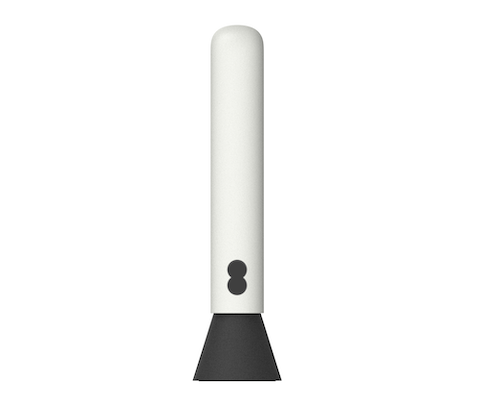
What's in the box
 | Your EE Smart 4G Hub | |
 | Power supply | |
 | USB cable | |
 | Keep Me Card | |
 | Product safety information | |
 | User Guide |
If you're replacing your Smart 4G Hub, the box might not include accessories. You can reuse the ones from your old hub. If accessories are provided, please use them to replace your old ones to ensure full compatibility with your new hub.
Physical description of device
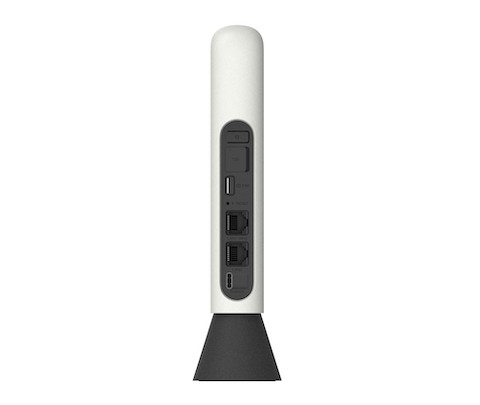
Connectors, ports and buttons on the rear of the Smart 4G Hub
 | Power button Press and hold the power button for 3 seconds to power on/off. |
 | Antenna port |
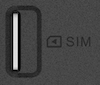 | SIM slot Following the SIM orientation icon beside the SIM slot, insert the SIM until it clicks into place. The metal side of SIM card should be facing left as it is inserted. |
 | Reset button Use a paper clip or blunt pin to gently press and hold the reset button for 5 seconds, the EE light onthe front of the hub will flash green, then off, and solid green while it is restarting. |
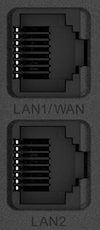 | WAN/LAN |
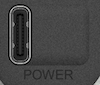 | Power connector |
Setup instructions
Connect to a power source
Plug the supplied USB cable into your Smart 4G Hub and connect the other end to the power adaptor.
Plug the adaptor into a power outlet. Once connected, the Smart 4G Hub will power on automatically.
Getting online
- Ensure your Smart 4G Hub is switched on and connected to the internet (the EE logo on the front of the hub will be solid aqua).
- On the device you want to connect to the internet, go to the network settings and search for your Smart 4G Hub WiFi network name (located on the label on the underside of the hub or on the Keep Me Card).
- Click connect.
- Enter the WiFi password on the on the label located on the underside of your Smart 4G Hub or the Keep Me Card.
What the lights on the Smart 4G Hub mean
Error states are displayed through the light on the front of the Hub.
| Colour on the front of the hub | What it means |
 | A solid aqua light shows your hub is connected to the internet. |
 | A flashing aqua light shows your Smart 4G Hub is connecting to the internet, wait one minute. |
 | A solid orange light shows your Smart 4G Hub is disconnected from EE. Log in to your hub via a web browser - go to http://192.168.1.1 and select Connect on the Status > Internet page. |
 | A solid red light shows there's a problem. Hold down the Power button for 3 seconds to turn off your Smart 4G Hub and then hold to turn it on again. If the light still doesn’t turn aqua, use a paper clip to press your hub’s reset button for 5 seconds. |
 | A flashing red light shows that your Smart 4G Hub is working, but isn’t connected to the internet. Check if your SIM is inserted correctly. You may be out of range of the signal, so try moving your hub to a different location on your property for better reception. |
 | Your Smart 4G Hub is starting up. Wait at least 3 minutes for it to turn aqua. If it stays green, turn your hub off and on again. If the light still doesn’t turn aqua, use a paper clip to press your hub’s reset button for 5 seconds. |
| Flashing White | You have received a text message. Log in using a web browser to http://192.168.1.1 to read your text messages. |
Disposing of your old electrical and electronic equipment
To help protect the environment, the UK Government requires that electrical and electronic equipment is not disposed of with general household waste. Instead, it should be collected separately and handled in an environmentally responsible way.
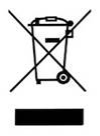 | This symbol on a product means you shouldn’t throw it in your normal rubbish at the end of its working life. |
This product may contain substances that could be harmful to people or the environment if it’s not recycled correctly. The equipment provided to you will remain the property of EE at all times (excluding outright sale equipment). You’ll need to return it back to us within 60 days of telling us you want to cancel, or we may need to charge you for it. You can do this by following the steps on this page ee.co.uk/returns
As the environment is important to EE, we can get rid of it in an environmentally friendly way.
If this equipment replaces something similar, then you can also dispose of your old kit by following the instructions above.
Returning and Recycling Your EE Equipment
This product may contain materials that could be harmful to people or the environment if not recycled properly. That’s why it’s important to dispose of it responsibly.
Returning Your Equipment
Unless you bought it outright, the equipment remains the property of EE. If you cancel your service, you’ll need to return the equipment within 60 days to avoid being charged.
You can return it by following the steps at: ee.co.uk/returns
Environmentally Friendly Disposal
EE is committed to protecting the environment. When you return your equipment, we’ll ensure it’s disposed of or recycled in an environmentally friendly way.
Safety notice and care instructions
Important safety and care instructions
Your HH10E is manufactured to comply with European safety standards. Please read the following instructions carefully before installing and using it.
Operating Environment
- the wireless device is not water-resistant. Keep it dry. Protect the wireless device from water or vapour. Do not touch the wireless device with a wet hand. Otherwise, short-circuit and malfunction of the product or electric shock may occur
- do not use the wireless device in dusty, damp and dirty places or places with magnetic field. Otherwise, malfunction of the circuit may occur
- on a thunder stormy day, do not use your wireless device outdoors
- the wireless device may interfere with nearby TV sets, radio and PCs
- in accordance with international standards for radio frequency and radiation, use wireless device accessories approved by the manufacturer only
- it is recommended that the equipment only be used in an environment where the temperature is between 0°C and 45°C
Conditions of Use
- switch this device off before boarding an aircraft
- switch this device off when you are in health care facilities, except in designated areas. As with many other types of equipment now in regular use, this device can interfere with other electrical or electronic devices, or equipment-using radio frequencies
- switch this device off when you are near gas or flammable liquids. Strictly obey all signs and instructions posted in a fuel depot, petrol station, chemical plant, or in any potentially explosive atmosphere
- when this device is switched on, it should be kept at least 15 cm from any medical device such as a pacemaker, a hearing aid or insulin pump, etc
- do not let children use this device without supervision
- when replacing the cover, please note that this device may contain substances that could create an allergic reaction
- always handle this device with care and keep it in a clean and dust-free place
- do not open, dismantle or attempt to repair this device yourself
- do not drop, throw or bend this device.
- do not paint it.
- use only chargers and accessories which are recommended by EE Ltd. and its affiliates and are compatible with your device model. EE Ltd. and its affiliates disclaim any liability for damage caused by the use of other chargers
Compliance information
Radio Equipment Directive Declaration of Conformity
EU
Hereby, EE Ltd. declares that the radio equipment model number HH10E is in compliance with Directive 2014/53/EU. The full text of the EU declaration of conformity is available at the following internet address: ee.co.uk/declaration-of-conformity
UK
Hereby, EE Ltd. declares that the radio equipment model number HH10E is in compliance with Radio Equipment Regulations 2017 and The Product Security and Telecommunications Infrastructure (Security Requirements for Relevant Connectable Products) Regulations 2023.
The full text of the UK declaration of conformity is available at: ee.co.uk/declaration-of-conformity.
To find the support period for your device go to: ee.co.uk/help/termsandconditions/general
Information on how to report security issues of the device can be found at ee.co.uk/help/terms-and-conditions/general/reporting-security-issue
Restrictions
This radio equipment is subject to certain restrictions when it is placed on the market in Belgium (BE), Bulgaria (BG), Czech Republic (CZ), Denmark (DK), Germany (DE), Estonia (EE), Ireland (IE), Greece (EL), Spain (ES), France (FR), Croatia (HR), Italy (IT), Cyprus (CY), Latvia (LV), Lithuania (LT), Luxembourg (LU), Hungary (HU), Malta (MT), Netherlands (NL), Austria (AT), Poland (PL), Portugal (PT), Romania (RO), Slovenia (SI), Slovakia (SK), Finland (FI), Sweden (SE), Northern Ireland (UK(NI)), Norway (NO), Switzerland (CH), Iceland (IS), Turkey (TR), Lichtenstein (LI). Wi-Fi 5 GHz: The frequency band 5150-5350 MHz is limited to indoor use.
This radio equipment is also subject to certain restrictions when it is placed on the market in United Kingdom (UK).
In accordance with the relevant statutory requirements in the UK, the 5150 to 5350 MHz frequency range is restricted to indoor use in the United Kingdom.
Radio transmission information
| Frequency bands | Max radio-frequency power |
| LTE FDD B1 (2100 MHz) | 25.7 dBm |
| LTE FDD B3 (1800 MHz) | 25.7 dBm |
| LTE FDD B7 (2600 MHz) | 25.7 dBm |
| LTE FDD B20 (800 MHz) | 25.7 dBm |
| 802.11 b/g/n 2.4GHz band | 19.61 dBm |
| 802.11 a/n/ac 5150 – 5350 MHz | 21.98 dBm |
| 802.11 a/n/ac 5470 – 5725 MHz | 24.49 dBm |
| 802.11 a/n/ac 5725 – 5875 MHz | 12.67 dBm |
Charger
Mains-powered chargers will operate within the temperature range of 0°C (32°F) to 40°C (104°F). The chargers designed for your device meet the standard for safety of information technology equipment and office equipment use. They are also compliant with the ecodesign directive 2009/125/EC. Due to different applicable electrical specifications, a charger you purchased in one jurisdiction may not work in another jurisdiction. They should be used for the purpose of charging only.
Model: MC-203
Input Voltage: 100-240V
Input AC Frequency: 50/60H
PSTI and software support
To find the support period for your device or to report security issues, go to: ee.co.uk/help/terms-and-conditions/general
Other support information
Technical specifications
WiFi standard
WiFi 5
Wireless capability
Dual band
2.4GHz
5GHz
Wired connections
1 x 1Gbps WAN/LAN
1 x 1Gbps LAN
Sustainability
Plastic-free packaging
Recycled casing
More accessibility information
EE's Here for You section has further information about Getting the most from your devices.